-
Type:
 Story
Story
-
Resolution: Done
-
Priority:
 High
High
-
Affects Version/s: None
-
None
-
FLW Sprint 51, FLW Sprint 52, FLW Sprint 53
-
FLW Mobile App
-
All
Applicable to both Utprerona and Mitanin
Module : Disease Control → Tuberculosis → TB Screening List → TB Screening Form **
Update the existing TB Screening Form workflow as per the approved prototype & BRD
Reference Prototype : TB Screening Form and TPT module Prototype (standalone).html
Reference BRD : https://pmp.piramalswasthya.org/confluence/spaces/AMRIT/pages/85753874/BRD+Sakhi+Mobile+App#BRDSakhiMobileApp-_Toc190870943TBScreening
Requirements
- Edit TB Screening Form
- Update the existing TB Screening form as per the referenced prototype.
- Ensure the fields, sequence, labels and workflow are aligned with the prototype.
- Rename the Buttons
- Show "Start Screening" in RED for patients who are Unscreened.
- Show "View" in GREEN for patients who are Screened. Also show a lable at the top with tick mark to show screened.
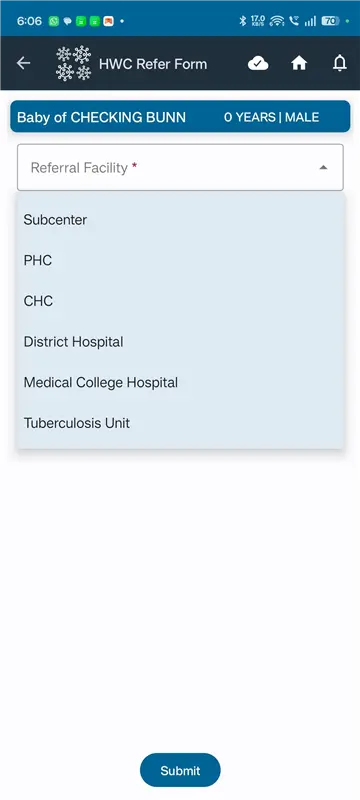
- Update the HWC Refer Form
- HWC Refer form : Update the Referral Facility drop down, Reason for Referral
- After the patient is referred, update the Status Follow up drop down, and the logic attached to moving the patient to either TB screening list, TB confirmed cases or TPT list
Acceptance Criteria
- TB Screening form with all the questions in the BRD
- Buttons are renamed to Start Screening and View
- Updated the HWC refer form and Status Follow up form
cc : madhava.ramu@piramalswasthya.org ritam.dubey@piramalswasthya.org
- is blocked by
-
AMM-2479 Add New Parameters in TB Screening Save API
-
- Closed
-