-
Type:
Bug
-
Resolution: Unresolved
-
Priority:
 High
High
-
Affects Version/s: None
-
None
-
STOP TB Sprint 2, STOP TB Sprint 6, STOP TB Sprint 8
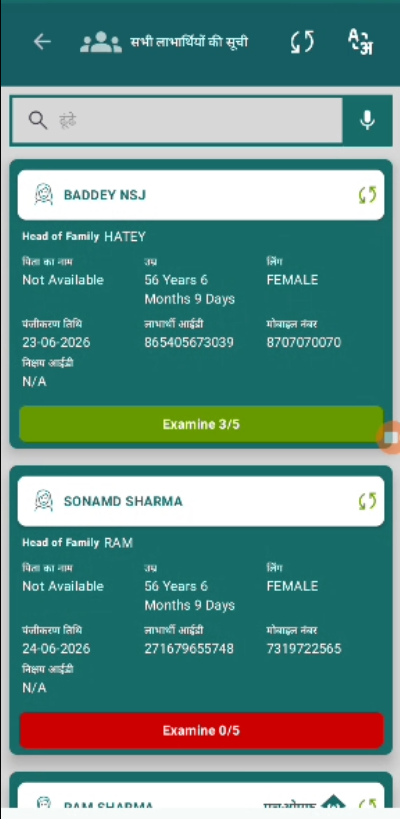
A language rendering issue has been identified across multiple screens of the StopTB-UAT application. When language is switched between English and Hindi, UI elements are not rendering in the correct selected language consistently.
This is a blanket ticket to fix ALL such language mismatch issues across the entire application.
Affected Elements (All Screens):
- Field labels and placeholder texts
- Screen titles and headings
- Button labels (Submit, Skip, AGREE, DISAGREE etc.)
- Dropdown and radio button option values
- Alert and dialog messages
- Validation error messages
Steps to Reproduce:
1. Open StopTB-UAT and select Hindi on Login screen.
2. Navigate through all screens of the application.
3. Observe any text still appearing in English.
4. Switch back to English and repeat.
5. Observe any text still appearing in Hindi.
Expected Result:
All text across all screens must render in the selected language only — no mixed language content.
Actual Result:
English text appears on some screens when Hindi is selected and Hindi text appears when English is selected. Issue is inconsistent across screens.
- relates to
-
-

- Closed
-
