-
Type:
Task
-
Resolution: Done
-
Priority:
 High
High
-
Affects Version/s: None
-
FLW Sprint 34, FLW Sprint 35, FLW Sprint 36, FLW Sprint 37
-
FLW Mobile App
-
All
Description
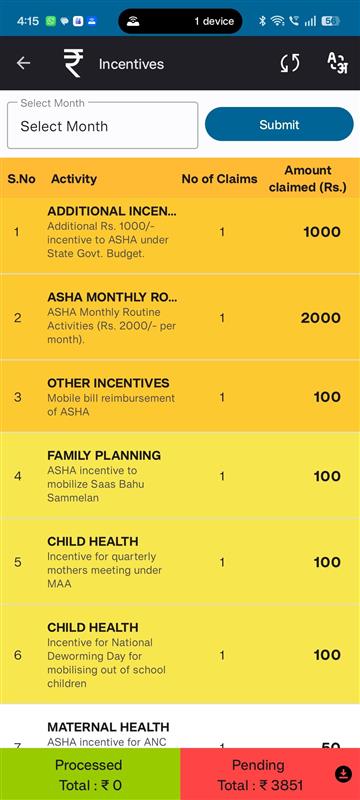
Update the UI to display incentive activities in a defined order, with distinct background colors and specific interaction behavior based on activity type.
Requirements
1. Monthly Default Incentive Activities
- Must appear at the top of the activity list.
- Should have a distinct background color to differentiate from other categories.
- No click action — these items should be non-interactive.
2. ASHA Meeting Related Activities
- Listed after the Monthly Default Incentive Activities.
- Should use a different background color from the default activities and beneficiary activities.
- No click action — these items should be non-interactive.
3. Beneficiary Related Activities
- Displayed after the ASHA Meeting Related Activities.
- Should display the count of beneficiaries associated with the activity.
- Clickable — tapping should navigate to the Beneficiary Details screen.
- relates to
-
 FLW-555
Enhance Incentive Screen – Display Order, color, and State-based Configurations for ASHA Users
FLW-555
Enhance Incentive Screen – Display Order, color, and State-based Configurations for ASHA Users
-
- Closed
-

