-
Type:
Bug
-
Resolution: Unresolved
-
Priority:
 Highest
-
Affects Version/s: None
-
None
Description
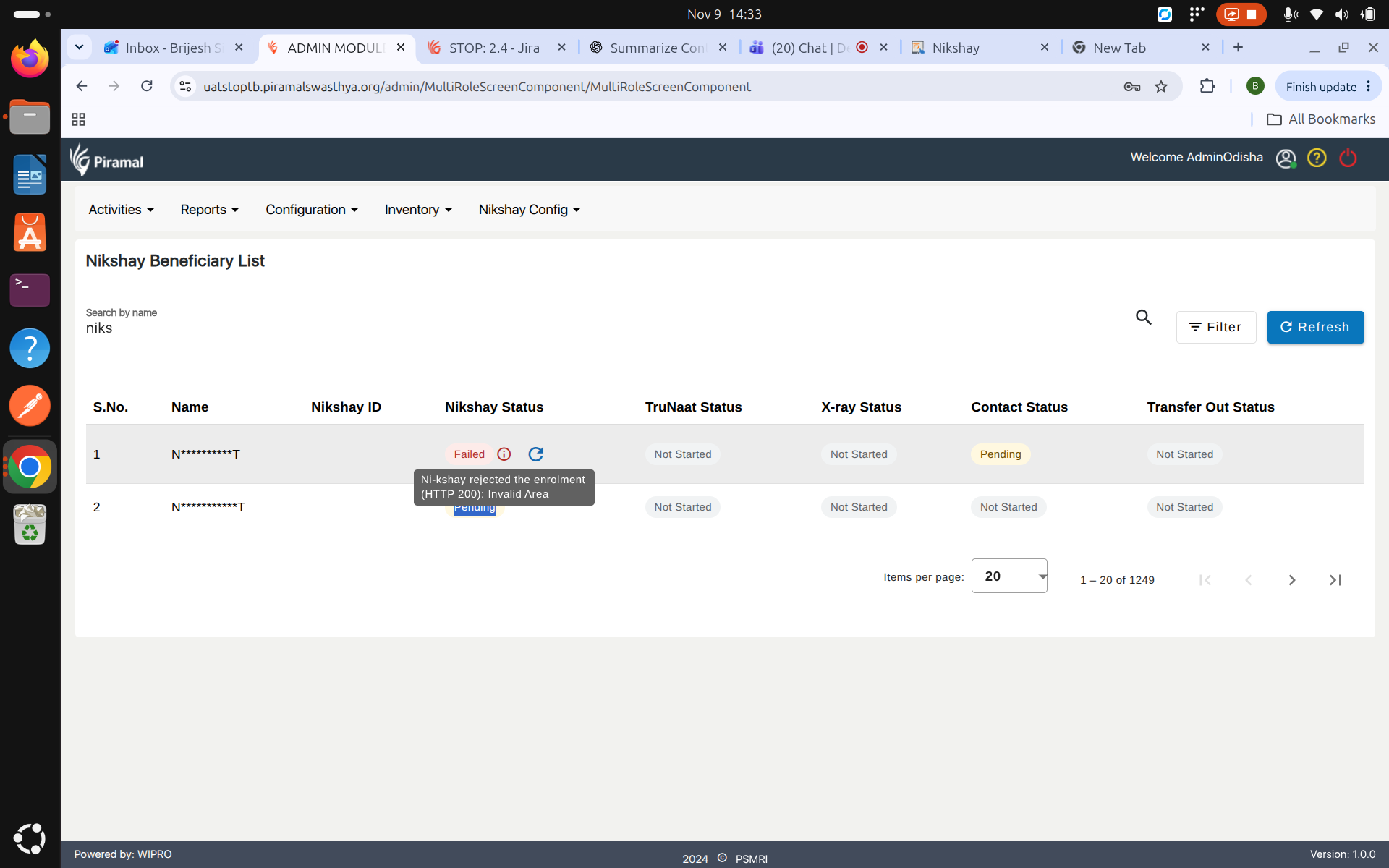
After completing all the required process steps and triggering the Nikshay enrolment job, the beneficiary enrolment failed.
The system displayed the following error:
"Ni-kshay rejected the enrolment (HTTP 200): Invalid Area"
For this enrolment attempt, Abhaymukhi village was selected during both:
- Beneficiary Registration
- NAAT-PHI Process
Steps to Reproduce (STR)
- Log in to the application with valid credentials.
- Navigate to Beneficiary Registration.
- Register a beneficiary and select Abhaymukhi as the village.
- Complete the NAAT-PHI process for the same beneficiary.
- Select Abhaymukhi as the village in the NAAT-PHI process as well.
- Complete all the required process steps.
- Trigger the Nikshay enrolment job.
- Navigate to Admin Module → Nikshay Beneficiary List.
- Search for the beneficiary and check the Nikshay Status.
Expected Result
The system should successfully process the beneficiary's Nikshay enrolment when a valid village is selected.
Actual Result
Nikshay enrolment fails after triggering the enrolment job.