-
Type:
Bug
-
Resolution: Done
-
Priority:
 Medium
-
Affects Version/s: None
-
None
-
STOP TB Sprint 7
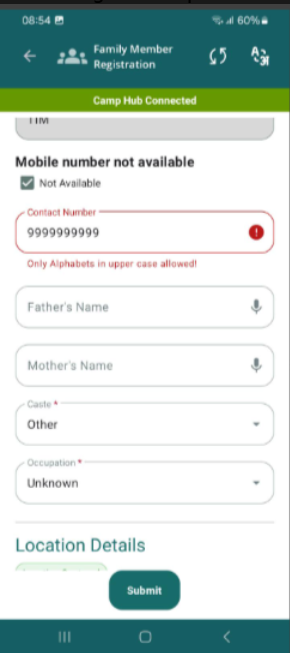
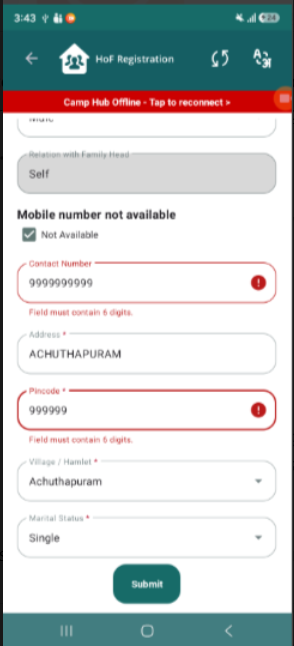
When registering HOF/Family Member, two different messages are showing for Mobile Number field (Inconsistent).
Steps to Reproduce:
- Navigate to Registration screen
- Enter invalid mobile number (e.g., 9999999999)
- Observe validation message
- Repeat with different scenarios:
- Toggle “Mobile number not available”
- Enter alphabets / special characters
- Enter less/more than required digits
- Switch between online/offline mode
Actual Result:
- Different validation messages are shown for the same field:
- “Only Alphabets in upper case allowed”
- “Field must contain 6 digits”
- Messages are:
- Incorrect (mobile number should not allow alphabets)
- Inconsistent (different validations for same field)
Expected Result:
- Mobile number field should follow consistent validation rules:
- Only numeric values allowed
- Fixed length validation (e.g., 10 digits)
- Proper error messages like:
- “Mobile number must be 10 digits”
- “Only numbers are allowed”