-
Type:
Bug
-
Resolution: Done
-
Priority:
 High
High
-
Affects Version/s: None
-
None
Multiple issues observed in the Follow-up module related to validation, submission, and button behavior:
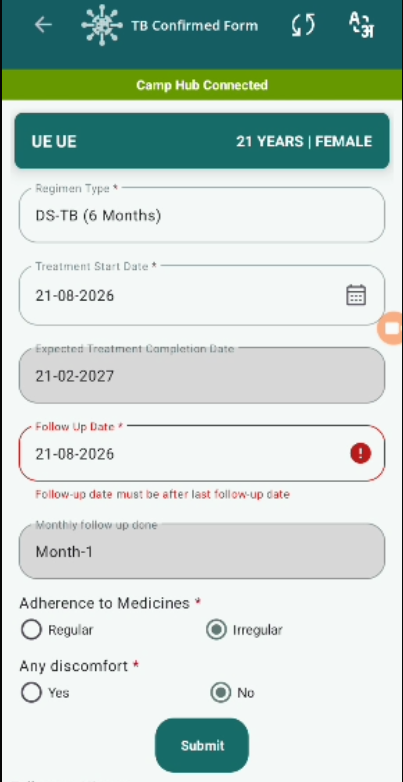
- Follow-up Date Validation Missing:
- System not not submitting form when follow up date is same as Last follow up date not showing error.
- No validation error message is displayed.
2. Submit Button Behavior Issue (Post Completion):
- After completing full 6-month follow-up cycle, Submit button remains visible and active.
- It should be disabled or hidden to prevent duplicate/invalid entries.
Steps to Reproduce:
- Open a confirmed TB beneficiary.
- Navigate to Follow-up module.
- Enter follow-up date same as last follow-up date.
- Fill remaining details and click Submit.
- Observe submission behavior.
- Complete follow-ups up to 6 months.
- Check Submit button visibility.
Expected Result:
- Follow-up date should be strictly greater than last follow-up date.
- Proper validation error should be shown for invalid date.
- Form should submit successfully when all fields are valid.
- Submit button should be disabled/hidden after completing 6-month follow-up cycle.
Actual Result:
- No validation shown for invalid follow-up date.
- Form is not getting submitted.
- No error message displayed.
- Submit button remains active even after completion.