-
Type:
Bug
-
Resolution: Done
-
Priority:
 High
High
-
Affects Version/s: None
-
None
Multiple UI and workflow-related issues are observed in the Counselling module:
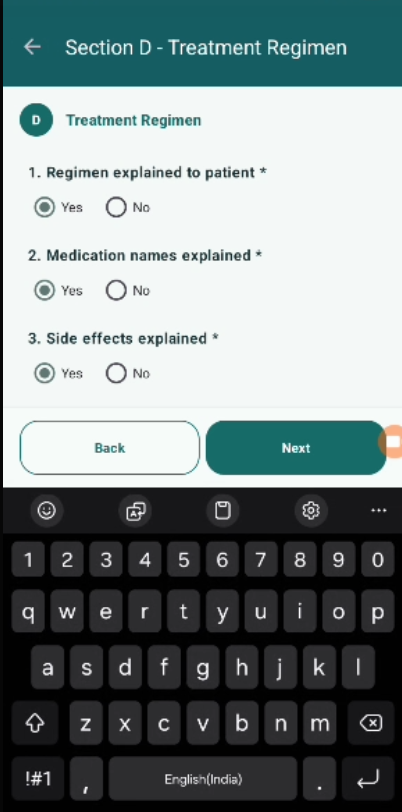
- Keyboard Overlap Issue (Notes Field):
When entering notes in Section A (and other sections), the on-screen keyboard overlaps the input field and "Next" button, making it difficult for the user to view and interact with the screen. - "Start Counselling" Button Visibility Issue:
The "Start Counselling" button is still visible even after all counselling sections (A–E) are completed, which should not happen. - Incorrect Button Visibility After Counselling Completion:
When the beneficiary is already marked as "Counselled":
-
- "Start Counselling" button should NOT be displayed
- "Follow-Up" button should NOT be displayed (if workflow completed or based on PRD rules)
However, these buttons are still visible.
Steps to Reproduce:
Issue 1:
- Navigate to Counselling → Section A.
- Tap on notes field.
- Observe screen behavior when keyboard appears.
Issue 2:
- Complete all counselling sections (A–E).
- Observe button visibility.
Issue 3:
- Mark beneficiary as "Counselled".
- Reopen the record.
- Observe available action buttons.
Expected Result:
- Screen should adjust when keyboard opens (scrollable / input visible).
- "Start Counselling" button should be hidden after completing all sections.
- Once beneficiary is marked "Counselled":
- No "Start Counselling" button
- No incorrect action buttons visible
- UI should follow proper workflow state.
Actual Result:
- Notes field and buttons are hidden behind keyboard.
- "Start Counselling" button still visible after completion.
- Incorrect buttons shown even after counselling is completed.
- blocks
-
 STOP-141
Counselling Module
STOP-141
Counselling Module
-
- Closed
-
