-
Type:
Bug
-
Resolution: Done
-
Priority:
 High
High
-
Affects Version/s: None
-
None
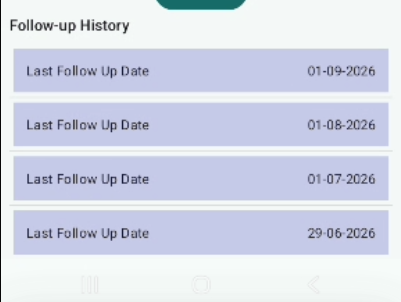
In the Follow-Up module, the "Last Follow-Up Date" entries under the Follow-Up History section are continuously increasing/duplicating automatically without any new follow-up action.
The same date entry is being repeated multiple times, leading to incorrect and inflated follow-up history records.
Steps to Reproduce:
- Navigate to TB Confirmed → Follow-Up module.
- Submit a follow-up entry.
- Scroll down to the "Follow-Up History" section.
- Observe the "Last Follow-Up Date" entries.
- Revisit the screen or perform minimal interaction.
Expected Result:
- Only one entry should be created per follow-up submission.
- Follow-Up History should display accurate and unique records.
- No duplicate or auto-generated entries should appear without user action.
Actual Result:
- "Last Follow-Up Date" entries are getting duplicated repeatedly.
- Entries increase automatically without additional submissions.
- Same date is shown multiple times.