-
Type:
Bug
-
Resolution: Done
-
Priority:
 High
High
-
Affects Version/s: None
-
None
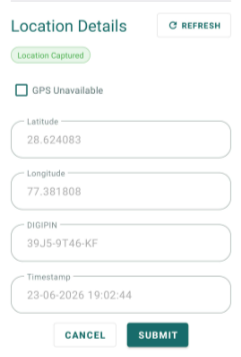
Three issues have been identified in the GPS / Location capture section of the Household Registration module related to DIGIPIN, an extra undocumented field, and a missing mandatory field as per PRD.
DEFECT 1 — DIGIPIN Not Displaying Correctly
Description:
The DIGIPIN field is not displaying as per PRD specification. DIGIPIN should be an auto-generated 10-character unique code (format: XXXX-XXXX-XX) captured from the device GPS at the time of household registration.
Steps to Reproduce:
1. Open Household Registration form.
2. Allow GPS/location permission.
3. Observe DIGIPIN field after
location capture.
Expected Result:
DIGIPIN auto-generated and displayed in format: XXXX-XXXX-XX. Read-only field. Non-editable after capture.
Actual Result:
DIGIPIN field not displaying correctly —It is displaying like XXXXXXXXXX.
DEFECT 2 — 'Capture at' Field Not Mentioned in PRD
Description:
A field named 'Capture at' is visible in the Household Registration screen but this field is NOT mentioned anywhere in the PRD. This is an undocumented field that has been added to the UI without PRD approval.
Steps to Reproduce:
1. Open Household Registration form.
2. Navigate to GPS / Location section.
3. Observe 'Capture at' field.
Expected Result:
'Capture at' field should NOT be present as it is not part of the PRD specification. Only the following GPS fields are defined in PRD:
- Latitude
- Longitude
- DIGIPIN
- Timestamp
- GPS Unavailable checkbox
- Reason (if GPS unavailable)
Actual Result:
'Capture at' field is visible on screen — extra undocumented field present in UI.
Action Required:
Clarification needed from Dr. Vanshika and Madhav:
- Was this field added intentionally?
- Should it be removed from UI?
- If it should exist — PRD must be updated to document this field.
DEFECT 3 — Timestamp Field Missing
Description:
The Timestamp field is defined in the PRD as a mandatory GPS capture field for
Household Registration but it is NOT visible on the current screen.
Steps to Reproduce:
1. Open Household Registration form.
2. Navigate to GPS / Location section.
3. Observe all fields in the section.
4. Check if Timestamp field is present.
Expected Result:
Timestamp field should be visible and auto-populated with date and time of GPS capture. Read-only field. Should display in format: DD-MM-YYYY HH:MM:SS.
Actual Result:
Timestamp field is completely missing from the Household Registration GPS section.
- blocks
-
 STOP-141
Counselling Module
STOP-141
Counselling Module
-
- Closed
-
