-
Type:
 Story
Story
-
Resolution: Unresolved
-
Priority:
 Highest
-
Affects Version/s: None
-
None
-
STOP TB Sprint 4, STOP TB Sprint 8
Make a separate line list section for unscreened population of a Village should be shown in the Dashboard.
1. In Dashboard >> "Unscreened Population"
Unscreened population:
Definition of Unscreened:
Total enumerated beneficiaries in a village, by default mark as "Unscreened";
By default show all registered beneficiaries under "Unscreened" list
Once any of the below Screening is completed, mark status as respectively:
Maintain "Status of screening" against every beneficiary record as follows:
- Unscreened
- Symptoms Screened
- Chest X- Ray Done
- Truenat Test Done
There should be a provision to mark beneficiaries as Unscreened or screened
Definition of Screened:
In screened, there are 3 stages of screening as follows:
- TB Symptoms Screening (verbal questions): if this is done: “Symptoms Screened”
- Chest X- Ray - Screening: If this test is completed: “Chest X- Ray Done”
- Truenat Test – Screening: If this test is completed: "Truenat Test Done”
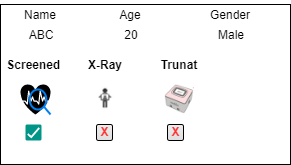
2. Every beneficiary record should have status fag as follows:
(This is applicable in Household Members list, All Beneficiaries list, Non-Household list and Unscreened list).
This should be in infographic, like with icon, status and result. (refer to attached image)
- Screened / Unscreened (based TB Symptoms Screening)
- Chest X- Ray + Status + Result
- Truenat + Status + Result
Sample View:
1. TB Symptoms
Circle with tick mark (Green color) or Circle with cross mark (Red color)
Presumptive (show if Presumptive only)
2. Chest X- Ray
Circle with tick mark (Green color) or Circle with cross mark (Red color)
Result (Show result only test is done)
3. Truenat
Circle with tick mark (Green color) or Circle with cross mark (Red color)
Result (Show result only test is done)