-
Type:
 Story
Story
-
Resolution: Done
-
Priority:
 High
High
-
Affects Version/s: None
-
None
-
STOP TB Sprint 6, STOP TB Sprint 7
Manage Role based user access approach, that is handling multiple roles (switching between multiple roles) by single User.
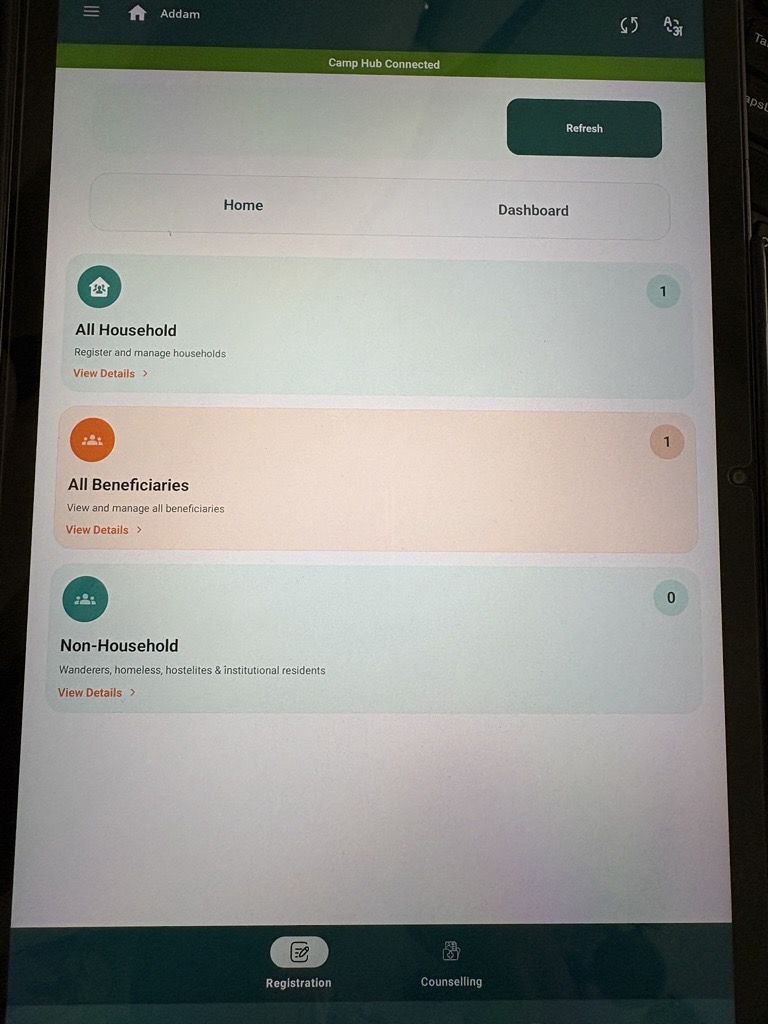
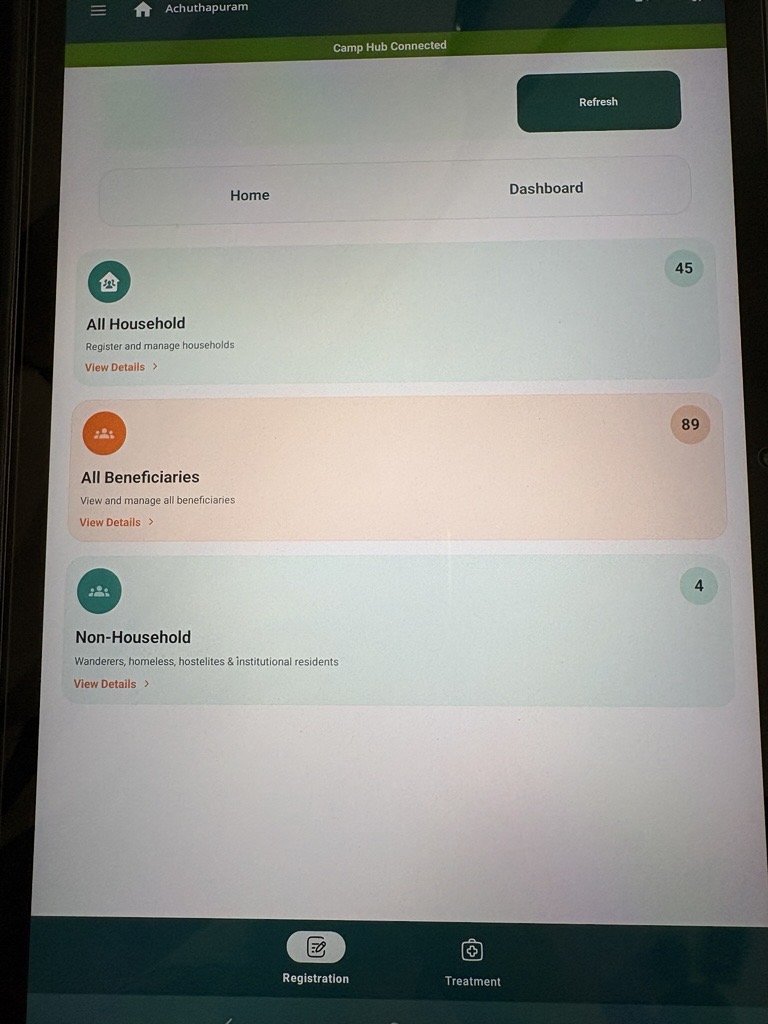
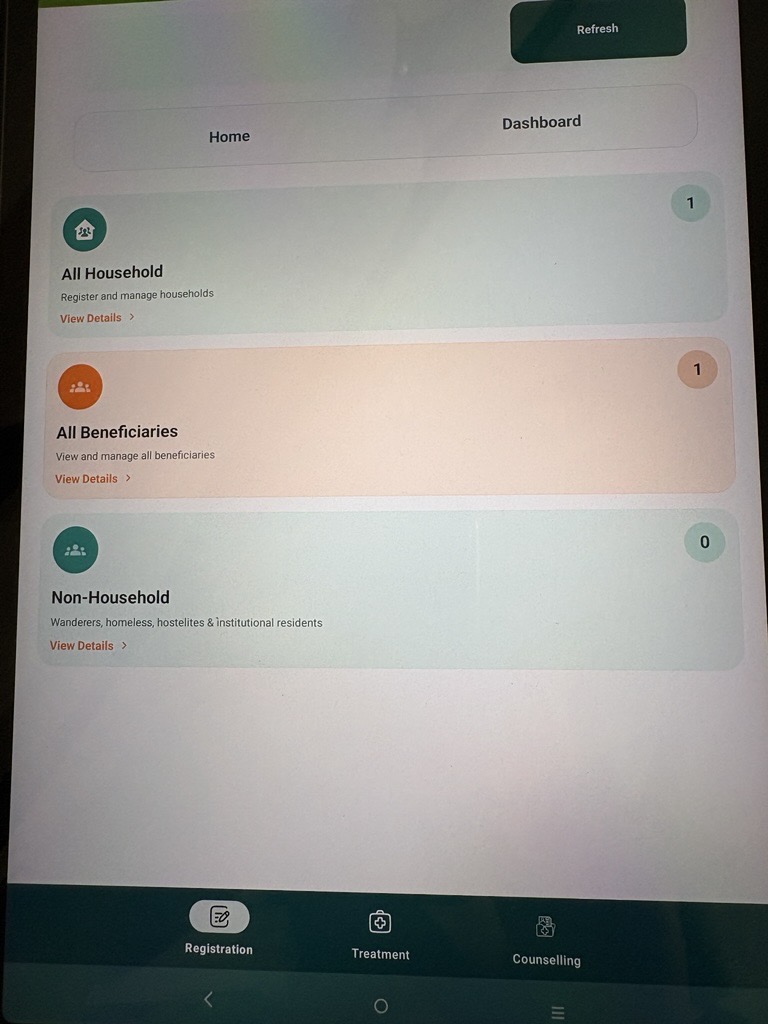
This should be handled using a bottom navigation bar with User assigned Role(s).{}
As an User, I am assigned to more then one role then I should able to switch between the activities of one role to another role activities.
Example:
If an User is assigned with two roles "Registrar" and "Nurse", then User should have two Role icons "Registrar" and "Nurse" on the bottom navigation bar to switch between the role based activities.
Acceptance Criteria:
1. If an User is assigned with a role "Registrar", then should be able to access following Modules and Privileges:
- All Household section (Privileges: View, Add, Edit and update access)
- All Beneficiaries section (Privileges: View, Add, Edit and update access)
- Non-Household section (Privileges: View, Add, Edit and update access)
- Anthropometry form (Privileges: View, Add, Edit and update access)
- TB Symptoms screening form (Privileges: View, Add, Edit and update access)
- Dashboard
2. If an User is assigned with a role "Nurse", then should be able to access following Modules and Privileges:
- All Household section (Privileges: View access)
- All Beneficiaries section (Privileges: View access)
- Non-Household section (Privileges: View access)
- Anthropometry form (Privileges: View, Add, Edit and update access)
- TB Symptoms screening form (Privileges: View, Add, Edit and update access)
- General Examination form (Privileges: View, Add, Edit and update access)
- General OPD form (Privileges: View, Add, Edit and update access)
- Referral section (Privileges: View, Add, Edit and update access)
- Tuberculosis section (Privileges: View access)
- Dashboard
3. If an User is assigned with a role "Counsellor", then should be able to access following Modules and Privileges:
- All Household section (Privileges: View access)
- All Beneficiaries section (Privileges: View access)
- Non-Household section (Privileges: View access)
- Anthropometry form (Privileges: View access)
- TB Symptoms screening form (Privileges: View access)
- Referral section (Privileges: View, Add, Edit and update access)
- Tuberculosis section (Privileges: View access)
- Counselling Module (View Add, Edit and update access)
- Contact Tracing Module (View Add, Edit and update access)
- TB Treatment Follow up Module (View Add, Edit and update access)
- TPT Module (View Add, Edit and update access)
- Dashboard
Example:
1. If an User is assigned with two roles "Registrar" and "Nurse", then should be able to access following Modules and Privileges:
- All Household section (Privileges: View, Add, Edit and update access)
- All Beneficiaries section (Privileges: View, Add, Edit and update access)
- Non-Household section (Privileges: View, Add, Edit and update access)
- Anthropometry form (Privileges: View, Add, Edit and update access)
- TB Symptoms screening form (Privileges: View, Add, Edit and update access)
- General Examination form (Privileges: View, Add, Edit and update access)
- General OPD form (Privileges: View, Add, Edit and update access)
- Referral section (Privileges: View, Add, Edit and update access)
- Tuberculosis section (Privileges: View access)
- Dashboard
2. If an User is assigned with two roles "Registrar" and "Counsellor", then should be able to access following Modules and Privileges:
- All Household section (Privileges: View, Add, Edit and update access)
- All Beneficiaries section (Privileges: View, Add, Edit and update access)
- Non-Household section (Privileges: View, Add, Edit and update access)
- Anthropometry form (Privileges: View, Add, Edit and update access)
- TB Symptoms screening form (Privileges: View, Add, Edit and update access)
- Referral section (Privileges: View, Add, Edit and update access)
- Tuberculosis section (Privileges: View access)
- Counselling Module (View Add, Edit and update access)
- Contact Tracing Module (View Add, Edit and update access)
- TB Treatment Follow up Module (View Add, Edit and update access)
- TPT Module (View Add, Edit and update access)
- Dashboard
3. Similarly, If an User is assigned with three roles "Registrar", "Nurse" and "Counsellor", then should able switch between the activities of all three roles.
Note:
User Role management is done by Admin from provider Admin panel in 'Work location mapping' section.
- is blocked by
-
STOP-427
Separate Counselling, Contact Tracing, TB Treatment Follow-up, and TPT into distinct modules/cards (blocker for Role Based User Access - STOP-138)
-
- Closed
-

