-
Type:
Bug
-
Resolution: Done
-
Priority:
 High
High
-
Affects Version/s: None
-
None
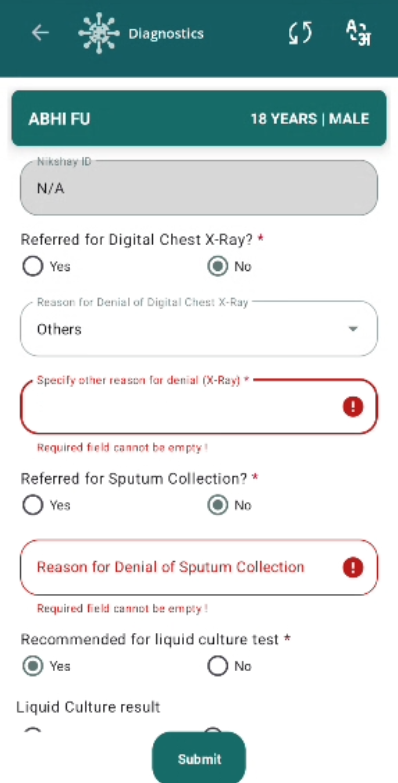
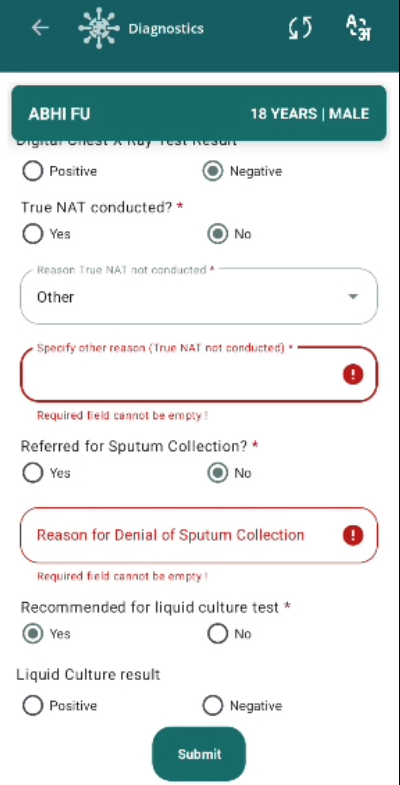
Validation error messages is missing for mandatory fields in diagnostics screen.
Steps to Reproduce:
- Select No in Referred for Digital Chest x-Ray.
- Observe Reason for Denial for Digital Chest X-Ray field.
- Now Select Others in Reason for Denial for Digital Chest X-Ray field.
- Observe Specify other reason for denial (X-Ray) field.
- Select No in Is Digital Chest x-Ray conducted.
- Observe Reason Digital Chest X-Ray not conducted field.
- Select No in Referred for Sputum Collection.
- Observe Reason for Denial of Sputum Collection field.
- Select No in True NAT conducted.
- Observe Reason True Not not conducted field.
- Now Select Others in Reason True NAT not conductued field.
- Observe Specify other reason True NAT not conducted field.
Expected Result:
Validation error message should appear for every mandatory field as per PRD.
Actual Result:
Without selecting values in mandatory fields user is able to submit the diagnostic form as validation error message is not appearing.