-
Type:
 Story
Story
-
Resolution: Done
-
Priority:
 Medium
-
Affects Version/s: None
-
HWC Sprint 18, HWC Sprint 19
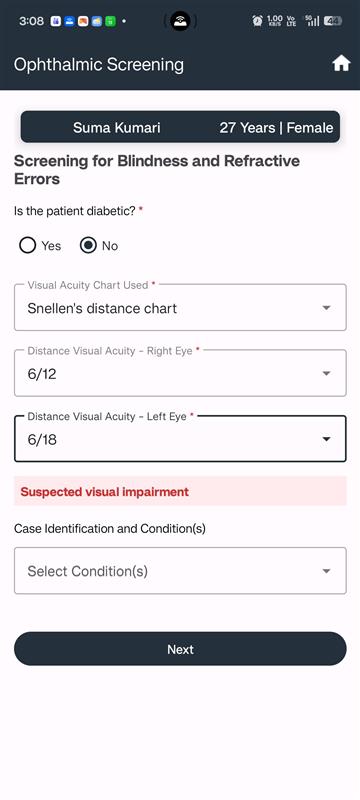
As a CHO, I want to select the appropriate visual acuity chart and record the patient’s visual acuity, so that I can identify visual impairment in non-diabetic patients.
Acceptance Criteria:
- If Is the patient diabetic = No, enable Visual Acuity Chart Used (dropdown, mandatory, single selection) with options:
- Snellen’s distance chart
- Near vision chart
- Based on the chart selection:
-
- If Snellen’s distance chart:
- Enable Distance Visual Acuity – Right Eye (dropdown, single selection, mandatory)
- 6/6
- 6/9
- 6/12
- 6/18
- 6/24
- 6/36
- 6/60
- <6/60
- Enable Distance Visual Acuity – Left Eye (dropdown, single selection, mandatory)
- If either eye ≤ 6/18, display alert “suspected visual impairment” and enable case identification module.
- Enable Distance Visual Acuity – Right Eye (dropdown, single selection, mandatory)
- If Near vision chart:
- Enable Near Visual Acuity (dropdown, mandatory, single selection)
- N6
- N8
- N10
- N12
- If reduced near vision with otherwise normal eye exam in adults, enable case identification module.
- Enable Near Visual Acuity (dropdown, mandatory, single selection)
- If Snellen’s distance chart:
- Next button should only proceed to vital screen and prescription if no case identification module is triggered.