-
Type:
Bug
-
Resolution: Done
-
Priority:
 High
High
-
Affects Version/s: None
-
FLW Mobile App
-
UAT
Description:
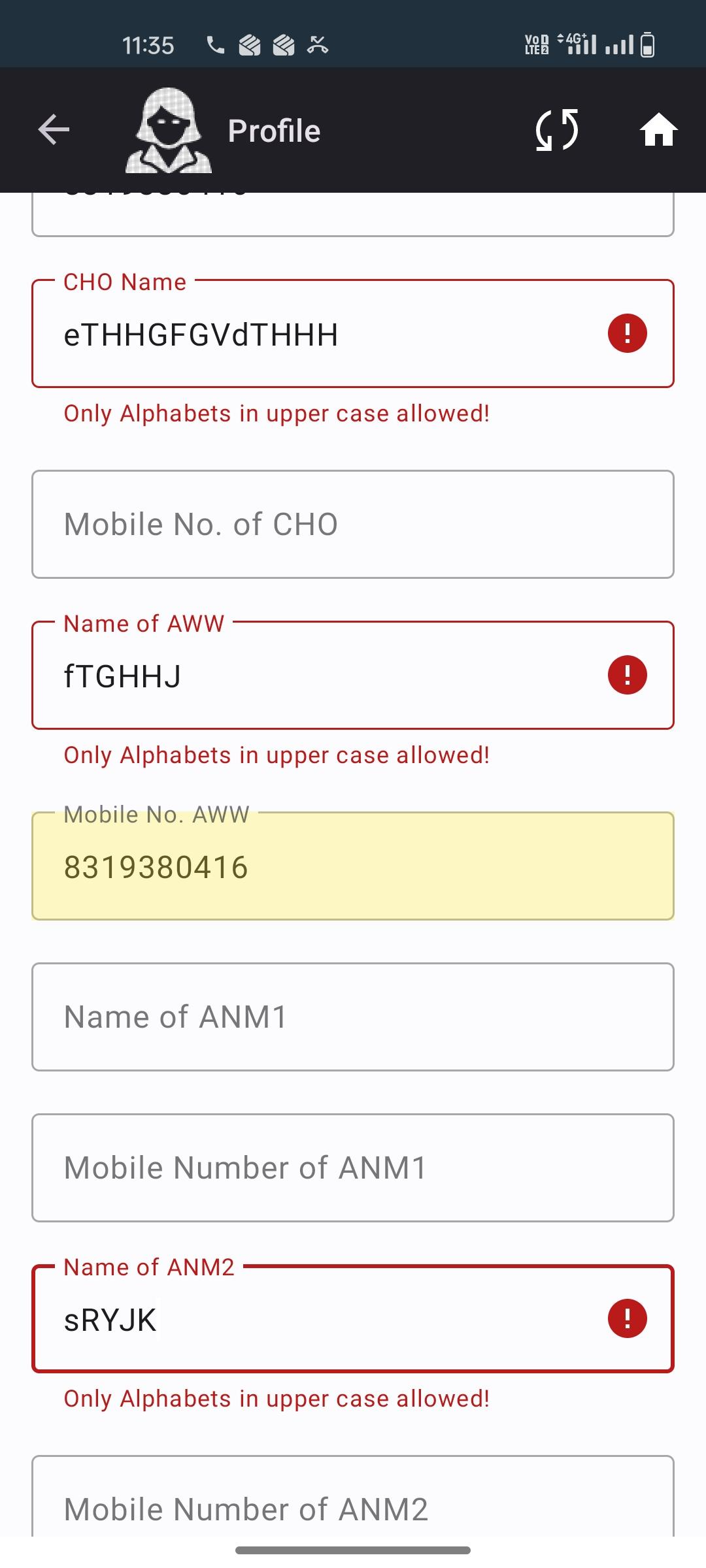
While editing the ASHA profile, an incorrect validation message appears stating “Only alphabet in upper case allowed”. This validation message is being triggered even when updating profile details where such restriction should not apply.
Additionally, after clearing the application data and logging in again, the ASHA profile picture disappears from the profile.
Steps to Reproduce:
- Open the application.
- Navigate to the ASHA Profile section.
- Click on Edit Profile.
- Update the required fields.
- Save the changes.
- Observe the validation message.
- relates to
-
FLW-794 ASHA Login - implement as per new changes in API
-

- Closed
-
-
-
- Closed
-
-
-
- Closed
-
-
-
- Closed
-