-
Type:
 Story
Story
-
Resolution: Done
-
Priority:
 Medium
-
Affects Version/s: None
-
None
-
FLW Sprint 42, FLW Sprint 43, FLW Sprint 44
-
FLW Mobile App
-
All
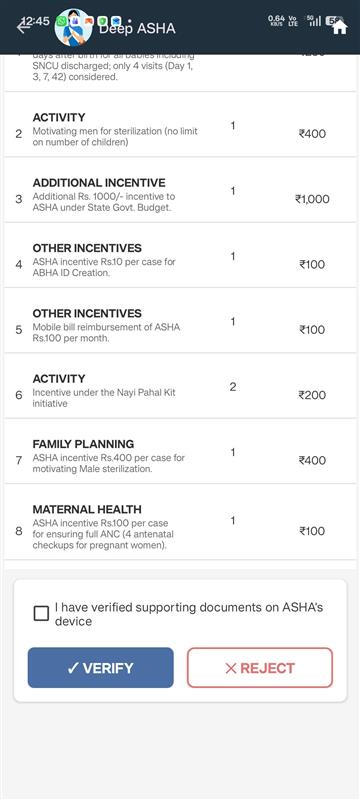
As a Supervisor, I want to review each activity individually and approve it after confirming document verification, so that I can ensure accuracy and accountability in incentive processing.
Functional Flow
Activity Listing
All activities for the selected month are displayed as expandable cards.
Collapsed Card View (Default)
Each activity card displays:
- Activity Name
- Activity Date
- Incentive Amount
- Status (e.g., Pending / Verified by Supervisor)
This allows quick scanning.
Expanded Card View
On clicking the card, it expands to show:
Activity Metadata (Read-only)
- Beneficiary details (if applicable)
- Service details
- Submission timestamp
- Supporting document reference
- Any system-generated fields
No fields are editable.
Approve Action
- Approve button is visible ONLY when status = Pending
- Not visible for already verified activities
Confirmation Requirement
Before approval, Supervisor must confirm: “I have verified supporting documents on ASHA device”
- Checkbox mandatory
- Approval disabled unless checked
- Confirmation logged with timestamp
Status Update Logic
Upon successful approval:
- Status changes to: “Verified by Supervisor”
- Incentive moves from:
- Pending amount → Approved amount
- Monthly summary auto-updates
- Audit trail entry created
Irreversibility Rule
- Once approved:
- Activity cannot be reverted
- No edit or revoke option
- Backend enforces immutable status after verification
Acceptance Criteria
- Activities displayed as expandable cards
- Collapsed view:
- Activity name
- Date
- Incentive amount
- Status
- Expanded view:
- Metadata (read-only)
- Approve button visible only for Pending activities
- Confirmation required:
- “I have verified supporting documents on ASHA device”
- Status updates to “Verified by Supervisor”
- Approved activities cannot be reverted
- relates to
-
FLW-777
State specific configuration in Supervisor Module
-

- Closed
-

