-
Type:
 Story
Story
-
Resolution: Done
-
Priority:
 High
High
-
Affects Version/s: None
-
FLW Sprint 34, FLW Sprint 35
-
FLW Mobile App
-
All
As an ASHA I want the app to guide me to the appropriate death reporting form (CDR) when a child dies, stop showing deceased children in follow-up lists, and show the date of death clearly, so that I can avoid redundant follow-ups and report deaths promptly and accurately.
Description
Improve the death handling workflow in HBNC and HBYC sections:
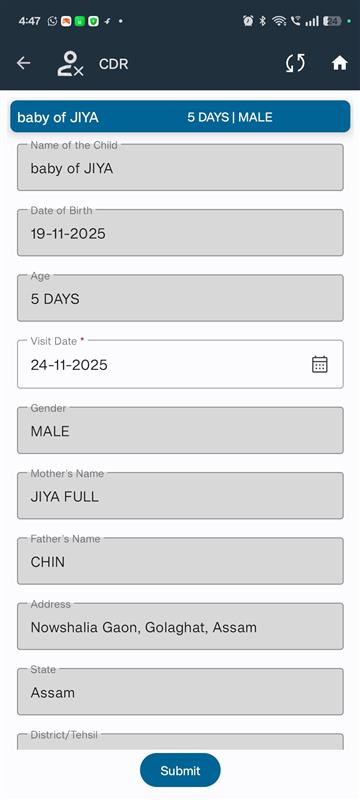
- Redirect to CDR form immediately after reporting a child death.
- Ensure child is no longer listed for future visits (Immunization, HBNC, HBYC).
- Show Date of Death in:
- Beneficiary line listing (on the card)
- CDR and MDSR form
Acceptance Criteria
Death Navigation from HBNC / HBYC to CDR Form
- In HBNC or HBYC section:
- If a child is marked as deceased during form submission:
- On Submit, automatically navigate to Death Reports > CDR Section
- Open CDR form with the child’s information pre-filled (where applicable)
- If a child is marked as deceased during form submission:
- Show a brief toast or popup: “Child marked as deceased. Please complete the CDR form.”
Exclude Deceased Children from Future Visits
- If a child is marked as deceased in:
- Beneficiary record, HBNC, or HBYC:
- That child should be excluded from:
- Future Immunization schedules
- HBNC follow-up visits
- HBYC follow-up visits
- That child should be excluded from:
- Beneficiary record, HBNC, or HBYC:
- Ensure logic is applied consistently across modules, including:
- Home screen listings
- Pending visits
- Upcoming visit alerts
Display “Date of Death” Across Forms and UI
- Show "Date of Death" field in:
-
- CDR Form (mandatory when child is reported deceased)
-
- MDSR Form (for maternal death cases)
-
- Beneficiary Cards in:
-
-
- Line listing view (display under name or DOB, in smaller font)
-
-
-
- Should show only if the beneficiary is marked as deceased
-
- Format: Date of Death: DD-MM-YYYY
- Visual cue: consider using a muted or grey card background for deceased beneficiaries