-
Type:
Task
-
Resolution: Done
-
Priority:
 Medium
-
Affects Version/s: None
-
None
-
FLW Sprint 19, FLW Sprint 20
-
FLW Mobile App
-
All
Improve UI and messages in ABHA screen
Alerts and display messages:
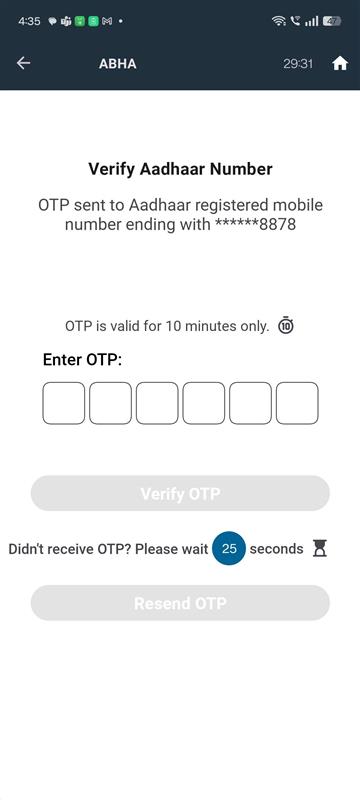
1. OTP sent on Mobile Number:
In the API response, we get last 4 digits of Mobile Number, so show this message
"An OTP has been sent to the Aadhaar-registered mobile number ending with xxxxxx0001" and
"An OTP has been sent to the mobile number ending with xxxxxx0002."
rename "Generate OTP" to "Sent OTP"
2. This OTP is valid for 10 minutes only. - show this message
3. Resend OTP UI
Improve Resend OTP UI part, follow below steps:
Enter OTP: 🔲 🔲 🔲 🔲
Didn't receive the OTP? Please wait 30 seconds⏳ (counting down...) [Resend OTP] (disabled, greyed out button)
After 00:00
[Resend OTP] button (active, bold color, clickable)