-
Type:
Bug
-
Resolution: Done
-
Priority:
 Highest
-
Affects Version/s: None
-
None
-
FLW Sprint 21, FLW Sprint 22, FLW Sprint 23, FLW Sprint 24, FLW Sprint 31
-
FLW Mobile App
-
Pre-Prod
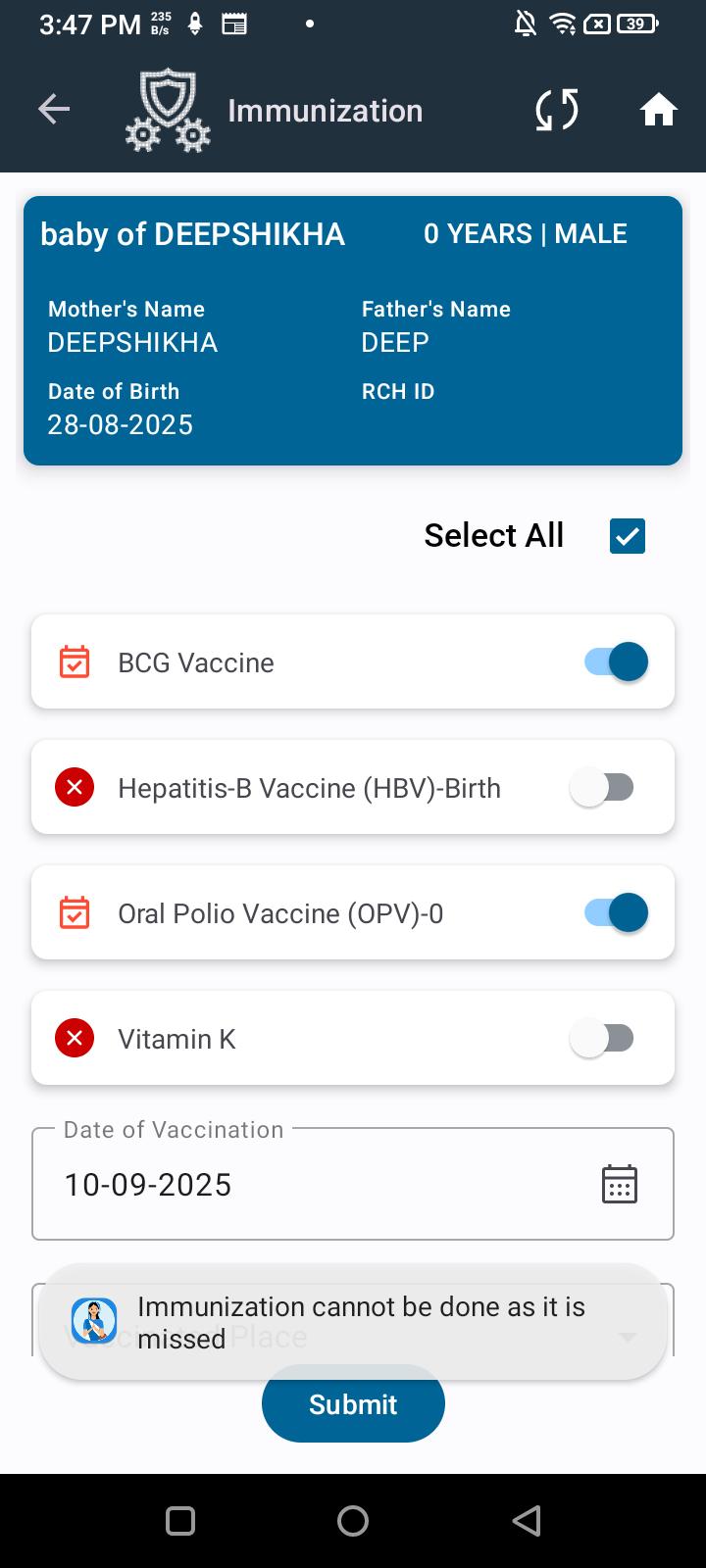
In the Immunization Module, users are unable to toggle/switch the button for multiple immunizations if the due date has already passed. This creates confusion as users do not receive any indication as to why the toggle is disabled. To improve user experience, the UI should be enhanced too, and a highlight or message should be added to inform users that the immunization is overdue and cannot be toggled.
Steps to Reproduce:
- Navigate to the Immunization Module.
- Select a beneficiary whose immunization due date has passed.
- Try to toggle the immunization switch.
- Observe that the switch does not respond, and no message is displayed explaining why.
Expected Result:
- The UI should provide a clear indication (highlight/message) that the immunization cannot be toggled because the due date has passed.
- The switch should be visually disabled with an appropriate tooltip/message.
- The UI layout too should be adjusted.
Actual Result:
- The toggle button is unresponsive, leading to confusion.
- No highlight/message explains why it is disabled.
- Users do not know that the due date has expired.
- relates to
-
FLW-248 Immunization section Child card UI, filter UI and implement search
-

- Closed
-
-
-
- Closed
-
-
 FLW-124
Manage UI and Update Birth Dose Immunization Due List with Fill Buttons
FLW-124
Manage UI and Update Birth Dose Immunization Due List with Fill Buttons
-

- Closed
-
