Story
Story
 Medium
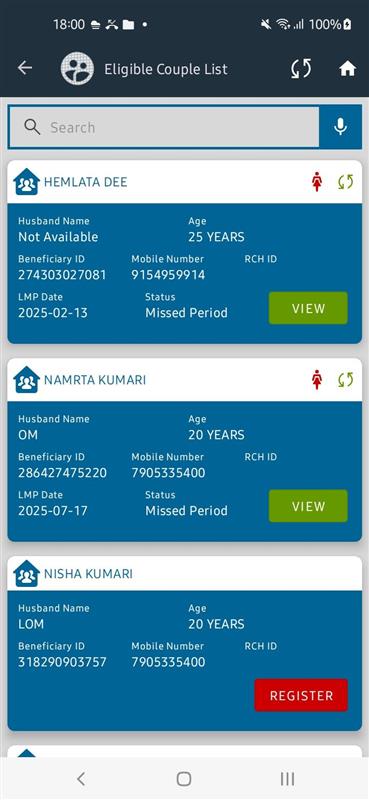
 As an ASHA worker, I want to record the Last Menstrual Period (LMP) date during the registration of eligible couples and track women who have missed their periods, so I can identify possible pregnancies early and take timely action.
Acceptance Criteria:
- LMP Date Field Addition:
-
- Add a new LMP Date field to:
- Eligible Couple Registration screen.
- Eligible Tracking screen.
- Ensure the field is mandatory during registration.
- Validate that the date entered cannot be in the future.
- Add a new LMP Date field to:
- Dashboard Indicator:
-
- Add a Missed Periods indicator to the dashboard, displaying the count of women flagged as having missed their periods.
- Clicking on the indicator should navigate to a detailed line listing.
- Line Listing Details:
-
- The line listing for flagged women should include:
- Name
- LMP Date
- Village
- Contact Information
- Status (e.g., Pending Follow-up, Under Review)
- Enable navigation to the beneficiary's profile from the line listing for follow-up actions.
- The line listing for flagged women should include:
- Missed Period Tracking Logic:
-
- Determine missed periods based on:
- LMP Date entered during registration.
- Predefined menstrual cycle duration (e.g., 28 days, adjustable in the system settings).
- Flag women where the difference between the current date and LMP exceeds the defined cycle duration without an updated LMP entry.
- Determine missed periods based on:
- mentioned in
-
Page Loading...