-
Type:
Task
-
Resolution: Unresolved
-
Priority:
 Low
-
Affects Version/s: None
-
None
-
FLW Mobile App
-
All
Module: Routine Immunisation
Type: UI Enhancement
Applicable for both Utprerona and Mitanin
1. Description
Implement the required UI/UX enhancements in the Routine Immunisation module to improve visual consistency, readability and clarity of vaccine due lists, along with updating the relevant labels and terminology.
2. Requirements
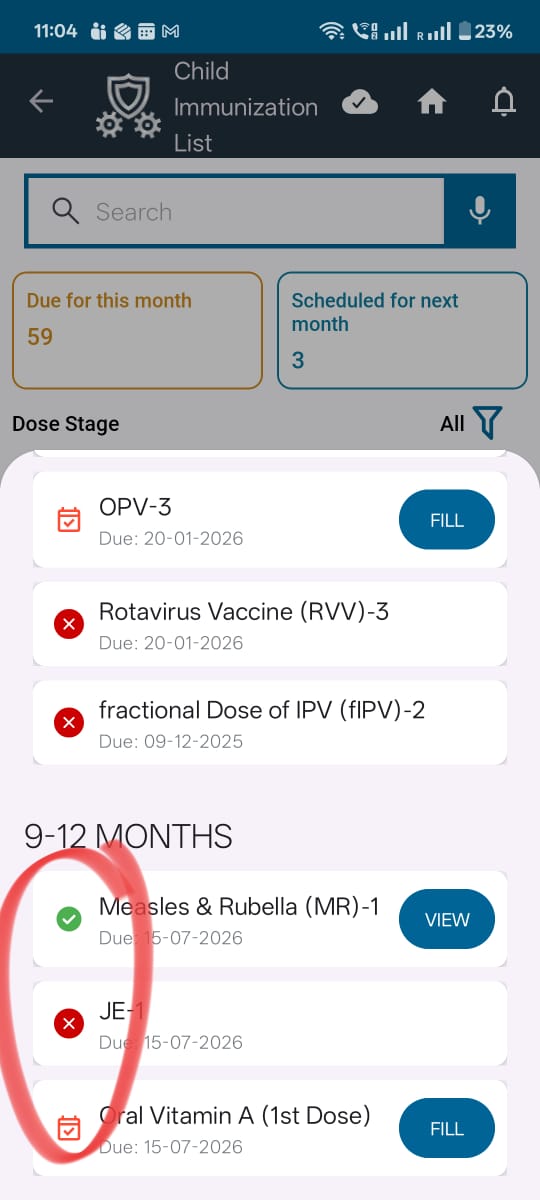
1. Update Vaccine Status Indicator Colour
Under Show Vaccines:
- Change the leftmost symbol/indicator for Due from its existing red shade to Yellow.
- Retain the existing colours for the Overdue and Done indicators without any changes.
- Refer to the attached screenshot for the expected visual representation.
2. Rename Module Title
- Change the title from "Child Immunization List" to "Routine Immunization".
3. Update Module Title Icon
- Ensure that the icon displayed alongside the title is the same as the home screen icon used for the Routine Immunization module.
4. Update "Due for this month" Box
Rename "Due for this month" to "This month due list".
Apply the following UI changes:
- Centre-align the title text.
- Display the count centrally within a circular element.
- Increase the count's font size and make it bold so that it is clearly noticeable.
- Change the box background colour from its existing orange shade to match the colour of the neighbouring box.
5. Update "Scheduled for next month" Box
Rename "Scheduled for next month" to "Next month due list".
Apply the following UI changes:
- Centre-align the title text.
- Display the count centrally within a circular element.
- Increase the count's font size and make it bold so that it is clearly noticeable.
- Retain the existing background colour of this box. No colour changes are required.
6. Rename and Reposition Dose Stage Filter
- Rename "Dose Stage" to "Filter by Dose".
- Right-align the filter and position it near the "All" option for better accessibility and alignment.
7. Update Beneficiary Count Terminology
- Replace the text "XX beneficiaries" with "XX children".
- Ensure that the corresponding labels displayed alongside the counts are also updated:
-
- "This month due list"
-
- "Next month due list"
Ensure that the terminology is consistent across the relevant count displays and vaccine list sections.
3. Acceptance Criteria
| ID | Acceptance Criteria |
|---|---|
| AC01 | The Due indicator under Show Vaccines is displayed in yellow instead of red. |
| AC02 | The existing indicator colours for Overdue and Done remain unchanged. |
| AC03 | The title "Child Immunization List" is replaced with "Routine Immunization". |
| AC04 | The title icon matches the Routine Immunization icon displayed on the home screen. |
| AC05 | "Due for this month" is renamed to "This month due list". |
| AC06 | The title of the This month due list box is centre-aligned. |
| AC07 | The count is displayed in a circle, centrally aligned, with a larger and bold font. |
| AC08 | The This month due list box background colour matches the neighbouring box. |
| AC09 | "Scheduled for next month" is renamed to "Next month due list". |
| AC10 | The Next month due list title is centre-aligned, and its count is displayed centrally in a circle with a larger, bold font. |
| AC11 | The existing background colour of the Next month due list box remains unchanged. |
| AC12 | "Dose Stage" is renamed to "Filter by Dose" and positioned towards the right, near the "All" option. |
| AC13 | The beneficiary count terminology is updated from "XX beneficiaries" to "XX children". |
| AC14 | The associated count labels consistently reflect "This month due list" and "Next month due list". |
| AC15 | All changes are implemented without impacting existing vaccine listing, filtering, counts or other module functionality. |
4. Reference
- Attached screenshot for the expected Due status indicator colour.
- Routine Immunization home screen icon for title icon reference.
5. Expected Outcome
The Routine Immunisation module should have a consistent and user-friendly interface, with clearly distinguishable vaccine status indicators, prominent monthly due counts, standardised terminology and improved alignment of filters and summary cards.