-
Type:
Bug
-
Resolution: Done
-
Priority:
 Medium
-
Affects Version/s: None
-
None
-
FLW Mobile App
-
UAT
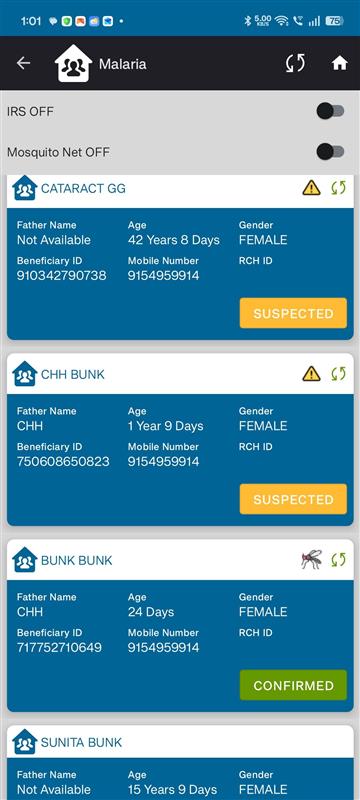
In the Malaria Screening section, the beneficiary's case classification is behaving inconsistently based on the radio button selection.
Steps to Reproduce:
- Navigate to the Malaria Screening form.
- Select the radio button option with value "1".
- Save/Submit the form.
- Observe the malaria case classification.
- Repeat the process without selecting any radio button option.
- Fill the remaining required fields and submit the form.
- Observe the malaria case classification.
Actual Result:
- When radio button value "1" is selected, the beneficiary is classified as a Confirmed Case.
- When no radio button option is selected and the form is submitted then after filling the radio button after submission, the beneficiary is classified as a Suspected Case.
Expected Result:
The malaria case classification should be determined based on the defined business rules and should not change incorrectly due to the absence of a radio button selection. Appropriate validation should be applied if the radio button selection is mandatory.