-
Type:
 Story
Story
-
Resolution: Done
-
Priority:
 Low
Low
-
Affects Version/s: None
-
None
-
FLW Sprint 46, FLW Sprint 47, FLW Sprint 48, FLW Sprint 49, FLW Sprint 50
-
FLW Mobile App
-
All
Centralise every notification used by the app under a single notifications surface. Group all triggers under four recipient categories (ASHA, ASHA Supervisor, CHO, ANM). Add a bell icon in the app header to open the notification panel, and persist every notification dispatch in the audit log so the backend can measure how often a notification preceded the desired action.
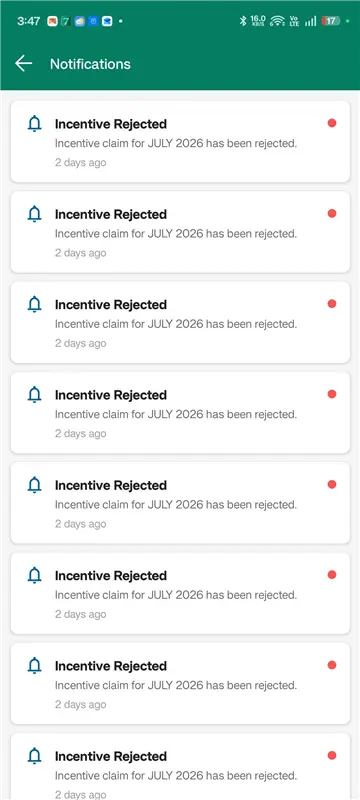
- Bell icon and notification panel (UI)
- Add a bell icon to the app header, top-right, placed beside the existing language toggle. Show an unread-count badge on the bell when unread notifications exist for the logged-in user.
- Tapping the bell opens the Notification panel:
- Lists all notifications for the logged-in user in reverse-chronological order.
- Each row shows: title · short message · timestamp · read/unread state.
- Tapping a notification opens the relevant screen (e.g., a Supervisor verification reminder opens the ASHA Monthly Detail screen for that ASHA-month; an ASHA rejection notification opens that ASHA's claim summary).
- Empty state shown when no notifications exist.
- A "Clear notifications" button is pinned at the bottom of the panel. Tapping it soft-clears the user's notification list (marks every notification as dismissed for that user). The underlying notification log record is not deleted — only the user-facing list is cleared. Show a confirmation prompt before clearing.
- Unread count on the bell refreshes after read / dismiss / clear.
- Notification triggers — grouped by recipient
For ASHA:
- Monthly claim submission reminder. Triggered inside the ASHA submission window read from the cut-off config (Ticket 2). Repeats at a configurable cadence inside the window until the ASHA submits.
- Rejection notification. Triggered when Supervisor, CHO, or ANM rejects the ASHA-month. One in-app notification carrying the chosen rejection reasons and remarks. Deep links to the ASHA's claim screen for resubmission.
- Stage-change notification. Notify the ASHA when their claim moves to "Verified by Supervisor", "Verified by CHO", "Verified by ANM", and "Eligible for SSD Processing" so they can see status progress.
For ASHA Supervisor:
- Verification reminder. Triggered 2 days after each ASHA's claim submission timestamp (this is the new 2-day grace; previously fired immediately on submission). The reminder highlights the count of ASHAs / activities pending the Supervisor's verification for the selected month.
- Recurring reminders. Continue at a configurable cadence until all pending verifications for that ASHA-month are complete.
- Auto-routing alert. When the configured Supervisor verification cut-off has elapsed and pending claims are routed to CHO/ANM (Ticket 2), the Supervisor receives one notification confirming the auto-routing.
For CHO:
- Verification reminder. Triggered when an ASHA-month arrives at the CHO stage — either via Supervisor verification or via auto-routing after the Supervisor cut-off elapses. Highlights the count of ASHAs pending CHO verification.
- Recurring reminders at a configurable cadence until CHO verification is complete.
For ANM:
- Verification reminder. Triggered when an ASHA-month arrives at the ANM stage (alternate path when CHO is unavailable, or via auto-routing). Highlights the count of ASHAs pending ANM verification.
- Recurring reminders at a configurable cadence until ANM verification is complete.
External channel (handled by this framework but not part of the bell icon):
- Medical Officer escalation. If a verification stage stays pending beyond the configured cut-off (Ticket 2), trigger Email + WhatsApp escalation to the mapped Medical Officer. Capped at once per Supervisor per month (§14.2).
- Configuration
- All notification templates (title, body, deep link target) and frequencies (initial trigger, recurring cadence, max attempts, attribution window) are configurable by the program team without a code change. Maintain templates per event type and per channel (in-app, email, WhatsApp).
- Notification logging and effectiveness measurement
- Persist every notification dispatch in a notification log with: event type, recipient ID and role, channel, template ID, payload variables, timestamp, delivery status.
- Persist every user interaction with a notification: viewed, tapped (with deep-link target), dismissed, cleared.
- Effectiveness attribution: when a downstream action occurs (ASHA claim submission, ASHA resubmission, Verify ASHA-Month, Reject ASHA-Month at Supervisor / CHO / ANM stage), the audit log entry for that action must record whether a relevant notification was dispatched to the actor within a configurable attribution window before the action (recommended default: 7 days). This lets the backend compute "notification → action" attribution.
- Provide a backend query / report endpoint that returns, for a given period: notifications dispatched, viewed, tapped, and "followed by the expected action within the attribution window" — broken down by event type and recipient role.
Affected modules: FLW Android app (header bell icon and notification panel across ASHA, Supervisor, CHO, ANM logins); Notification service (templates, dispatch, recurring scheduler, attribution writer); Configuration service (templates and frequencies); Email gateway and WhatsApp Business API integration; Notification log datastore; Audit log datastore (with attribution linkage to notifications).
- relates to
-
FLW-1082
Build the in-app notifications foundation, the ASHA rejection notification, and the Supervisor 2-day verification reminder as one deliverable.
-

- Closed
-
-
FLW-1083
Add deeplink routing to the notification panel for every existing and future event type.
-
- Closed
-
-
FLW-1084
Roll out the remaining in-app notification triggers across ASHA, Supervisor, CHO, and ANM.
-
- Closed
-
-
FLW-1085
Add Email and WhatsApp channels with MO escalation, and make all notification templates and frequencies configurable.
-
- Closed
-
-
FLW-1086
Add notification-to-action attribution in the audit log, and provide an effectiveness reporting endpoint.
-
- Closed
-
