-
Type:
Bug
-
Resolution: Done
-
Priority:
 Medium
-
Affects Version/s: None
-
None
-
HWC Web App
-
UAT
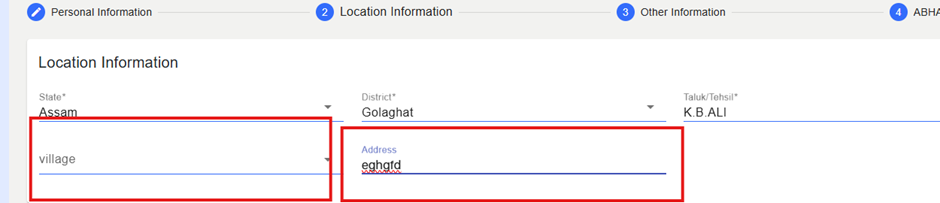
During Registration, floating field labels (e.g., Village, Address, etc.) appear clear initially, but once the user clicks on an input field or enters text, the label shifts upward and becomes slightly blurred. This results in reduced readability and inconsistent UI behavior.
Steps to Reproduce:
- Login to the application.
- Navigate to Registration.
- Click on any input field such as Village, Address, etc.
- Observe the floating label when the cursor focuses on the field or when text is entered.
Expected Result:
Floating labels should remain sharp, readable, and visually consistent before and after focusing or entering text.
Actual Result:
Floating labels become blurry and distorted when the user focuses on the field or enters a value.